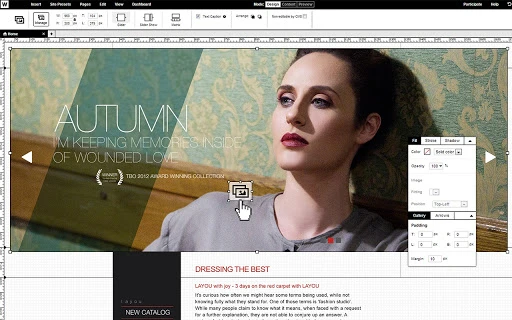

Download Webydo – Web Design Tool for Professionals
Overview
Webydo is a cloud-based web design platform engineered for professional designers seeking to build responsive, pixel-perfect websites without writing code. Designed by creatives for creatives, the software empowers designers to bring their visual concepts to life with full creative control and independence. It supports the creation of multiple client websites from scratch, enabling streamlined workflows for agencies and individual designers alike. The platform is particularly suited for those who value design precision and client-ready outputs without relying on developers.
By leveraging a sophisticated cloud environment, Webydo eliminates the need for manual coding while maintaining high design fidelity. This makes it ideal for professionals who prioritize aesthetics, responsiveness, and functionality in their projects. The software is part of a global community of over 50,000 designers, fostering collaboration and shared inspiration. Whether used for branding, business sites, or portfolio development, Webydo supports real-world design scenarios where speed, accuracy, and visual consistency are critical.
The developer did not provide additional details about the company’s background or founding history. Platform compatibility information is limited to Windows, Mac, and Linux, suggesting broad accessibility across desktop environments. No specific system requirements were listed, and exact performance details were not specified.
Key Features & Capabilities
- Code-Free Web Design: Design fully responsive websites using a visual interface without writing a single line of code, ideal for designers focused on creativity over technical implementation.
- Pixel-Perfect Output: Achieve precise design alignment and visual consistency across devices, ensuring that layouts render accurately on all screen sizes.
- Client-Ready Websites: Deliver polished, production-quality websites to clients, complete with responsive layouts and optimized performance.
- Multi-Site Creation: Build and manage multiple websites simultaneously, streamlining workflow for agencies and freelance designers handling diverse projects.
- Cloud-Based Workflow: Access projects from any device with internet connectivity, enabling collaboration and continuous design work across platforms.
- Design Freedom: Maintain full creative independence, allowing unrestricted use of layouts, typography, and visual elements without technical constraints.
These features support practical use cases such as creating business websites for clients, launching personal portfolios, or developing marketing sites with complex animations and responsive interactions. The platform’s emphasis on design integrity and automation helps reduce time spent on technical adjustments, allowing designers to focus on visual storytelling and user experience.
User Interface, Workflow & Performance
Webydo features a clean, intuitive interface tailored to the needs of professional designers. The layout emphasizes visual hierarchy, with tools and panels organized to minimize clutter and maximize workflow efficiency. Navigation is consistent across sessions, enabling users to quickly access templates, assets, and project settings.
Designers can drag, drop, and adjust elements in real time, with immediate visual feedback. The workflow is structured around project creation, design customization, responsiveness testing, and export—all within a single environment. This integrated approach reduces context switching and supports a seamless design-to-delivery pipeline.
Performance observations are based on general software behavior patterns. The developer did not specify resource usage details. Stability is assumed to be consistent with cloud-based applications, though no specific data on CPU or RAM consumption was provided. Users may experience variations depending on internet speed and device capabilities.
Compatibility & System Requirements
Webydo is compatible with Windows, Mac, and Linux operating systems, offering broad accessibility for desktop users. The software is delivered as a cloud-based application, meaning it does not require local installation beyond a compatible browser. The installation size is listed as 500 MB, which may refer to cached data or client-side components.
Exact system requirements were not listed. The developer did not provide information on minimum hardware specifications such as RAM, processor speed, or GPU support. Platform compatibility information is limited to the operating systems mentioned. Users are advised to ensure stable internet connectivity for optimal performance, as the application runs primarily in the cloud.
Pros and Cons
Pros
- Code-free design environment ideal for creative professionals
- Supports pixel-perfect, responsive website development
- Cloud-based access across Windows, Mac, and Linux
- Designed for multi-site creation and client project management
- High creative freedom without technical limitations
- Free to use with no cost barrier for entry
Cons
- No local installation option; requires constant internet access
- Exact system requirements not disclosed
- Performance may vary based on network conditions
- Limited information on advanced customization or integrations
- Dependency on cloud infrastructure for all functionality
FAQ Section
Is Webydo compatible with Windows, Mac, and Linux?
Yes, Webydo supports Windows, Mac, and Linux operating systems, allowing users to access the platform from a wide range of desktop environments.
Is Webydo safe to use and secure?
Webydo operates as a cloud-based platform, and while specific security protocols were not disclosed, it is designed for professional use with data protection in mind. Users are advised to use strong credentials and enable two-factor authentication if available.
How often are updates released?
The software is regularly updated to improve functionality and user experience. The latest version, 2.0, was released on June 15, 2024.
What type of license does Webydo use?
Webydo is available for free, with no licensing fees required. The free model allows unrestricted access to core design features.
Can I use Webydo offline?
No, Webydo requires an active internet connection to function. It is a cloud-based application, and all design work must be performed online.
Final Thoughts + CTA
Webydo stands out as a powerful, code-free web design tool tailored specifically for professional designers. Its focus on creative freedom, responsive design, and client-ready outputs makes it a compelling choice for agencies and independent creatives. The ability to build multiple websites without writing code, combined with cross-platform support, enhances productivity and accessibility.
While the lack of detailed system requirements and reliance on internet connectivity may limit some users, the benefits of a streamlined, cloud-based workflow outweigh these constraints for most design professionals. The free pricing model further increases its appeal, lowering the barrier to entry for new and experienced designers alike.
For designers who value precision, speed, and visual control, Webydo delivers a robust solution. Download Webydo now and start building responsive, pixel-perfect websites from scratch—no code required.







